
Work In Progress
Leave the accepted dates blank and it’s a snapshot of everything open right now.
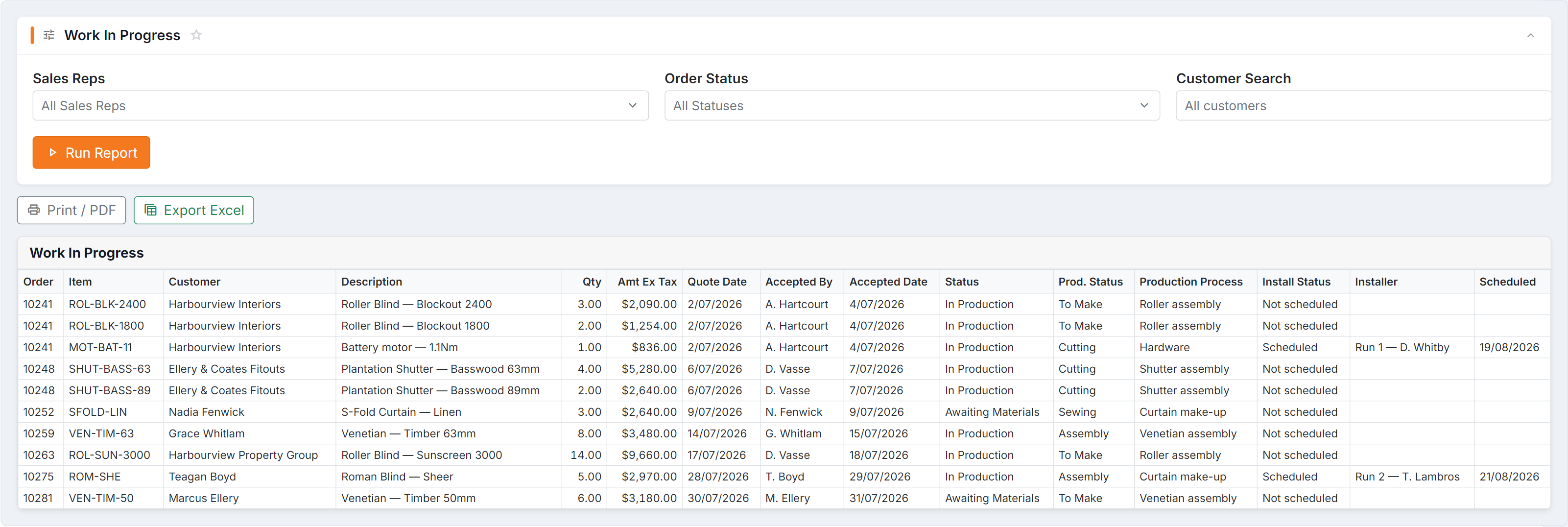
Figure 1 — Work In Progress: every accepted order that isn’t finished, one row per line item. An old Accepted Date against an early Prod. Status is the classic warning sign; an empty Scheduled or Installer means it isn’t booked in yet.
Parameters
Section titled “Parameters”| Parameter | Notes |
|---|---|
| Accepted Date From / To | Leave blank for every open order |
| Sales Reps | Leave empty for all reps |
| Order Status | Leave empty for all statuses |
| Customer Search | Part of a customer name |
| Production Lines | Only lines made on these production lines |
| Job Tracking Statuses / Job Tracking Processes / Dispatch Statuses | Only orders with lines at these production statuses, production processes or install statuses, e.g. Unstarted and Not Booked In. Each can be used on its own. A line with no status set yet still shows under the status filters; the process filter shows only lines at that process. Leave empty for all |
| Group By | Sales Rep (the default) or Production Line, which puts each order’s lines under their product line |
| Sort By | Customer (the default), Accepted Date, or Work Status: orders furthest behind come first, by production status then install status, in the order your statuses are set up in BUZ. Customers are listed in the same order, each with its orders under it |
The lists in each filter are in the order they’re set up in BUZ, and only show ones in use. Sales reps who’ve been deactivated are at the end, marked (Inactive).
Columns
Section titled “Columns”| Column | What it tells you |
|---|---|
| Customer | The heading over that customer’s orders, with how many there are and what they’re worth |
| Order | The order reference reads like 28460.A, so you can paste it straight into BUZ search |
| Product / Location / Qty | Each order’s lines, shown under it. Hide lines at the top of the report folds them away; click an order to open or close just that one |
| Amt Ex Tax | Value excluding tax |
| Quote Date | When it was quoted |
| Accepted By / Accepted Date | Who accepted it and when |
| Status | Order status, in the colour set for it in BUZ. An order on a Processing, To Be Invoiced, Production Commenced or Made type of status shows where its job is instead: Job Tracking (production) and Dispatch (install), as classic BUZ does |
| Job Tracking / Process | Where each line is in production |
| Scheduled / Install Type / Installer | The job’s booking, shown on the order line itself. An order with more than one booking lists each one, earliest first, in the same order in all three columns |
| Dispatch | Where each line is for install |
The Summary at the end gives each sales rep’s (or production line’s) orders, quantity and amount, with the total.
How to read it
Section titled “How to read it”- An old accepted date with an early production status is the classic warning sign.
- Filter by Order Status to see one stage at a time.
See also
Section titled “See also”- Jobs schedule reports — for the dated production view
- Capacity — for whether you can take more on