
Lead Conversions (by Rep & by Branch)
Both take Date From and Date To.
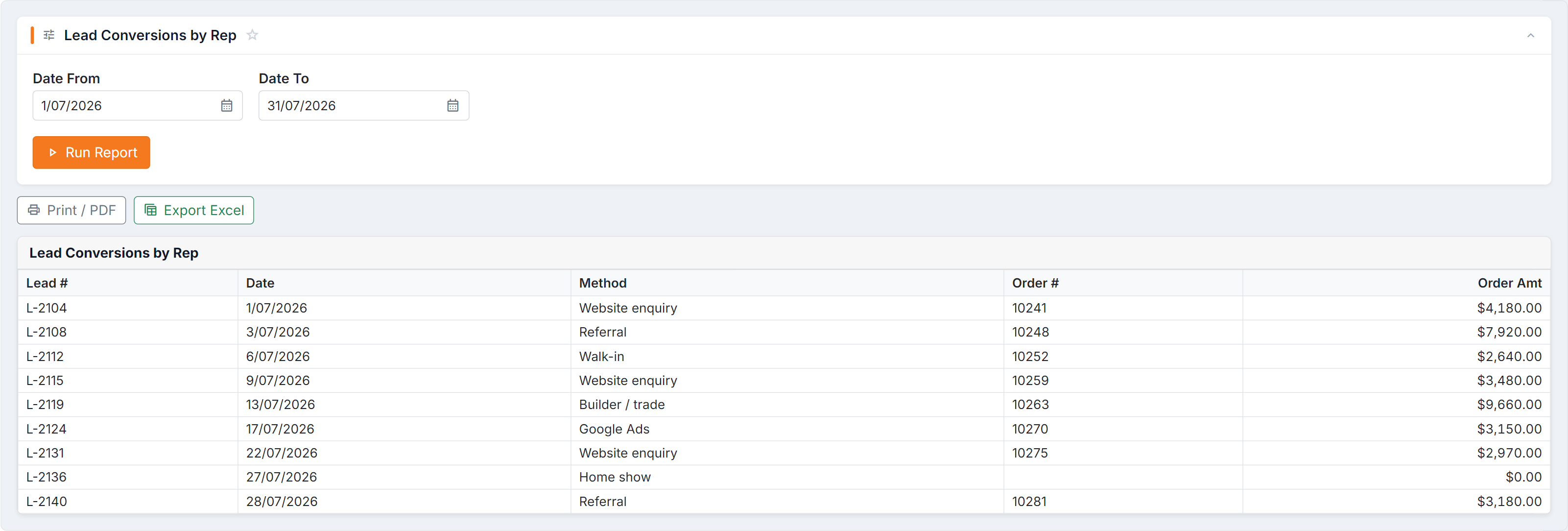
Figure 1 — Lead Conversions by Rep: the leads received in the window, the method each came in by, and the order it became. A blank Order # is a lead that hasn’t converted.
Columns
Section titled “Columns”| Column | Meaning |
|---|---|
| Lead # | The lead |
| Date | When it converted |
| Method | How it converted |
| Order # | The resulting order |
| Order Amt | What the order was worth |
How to read them
Section titled “How to read them”- Count vs value. Read them together, always. High volume at low value and low volume at high value are different businesses.
- Method shows which route converts. If one method dominates, it’s worth pushing.
- Pair with Leads Analysis to get a rate: conversions over total leads for the same window and grouping.
Common questions
Section titled “Common questions”| Question | Answer |
|---|---|
| A rep is missing | No conversions in that window — which is itself the finding. |
| Order Amt is blank | The order has no value recorded yet. |
| It doesn’t match my sales report | These count converted leads; sales reports count orders. An order with no lead behind it never appears here. |
See also
Section titled “See also”- Sales conversions — quote-stage win/loss
- Leads Sources