
Jobs Schedule reports
| Report | Grain | Use it for |
|---|---|---|
| Jobs Schedule (Summary) | One row per job | The production run-sheet |
| Jobs Schedule (Detailed) | One row per line item | Chasing a specific item, and job values |
| Jobs Schedule (Shutters) | One row per job, shutter fields | Shutter production, with SQM and install detail |
All three filter on production date — Production Date From / To (the Detailed report labels it Scheduled From / To).
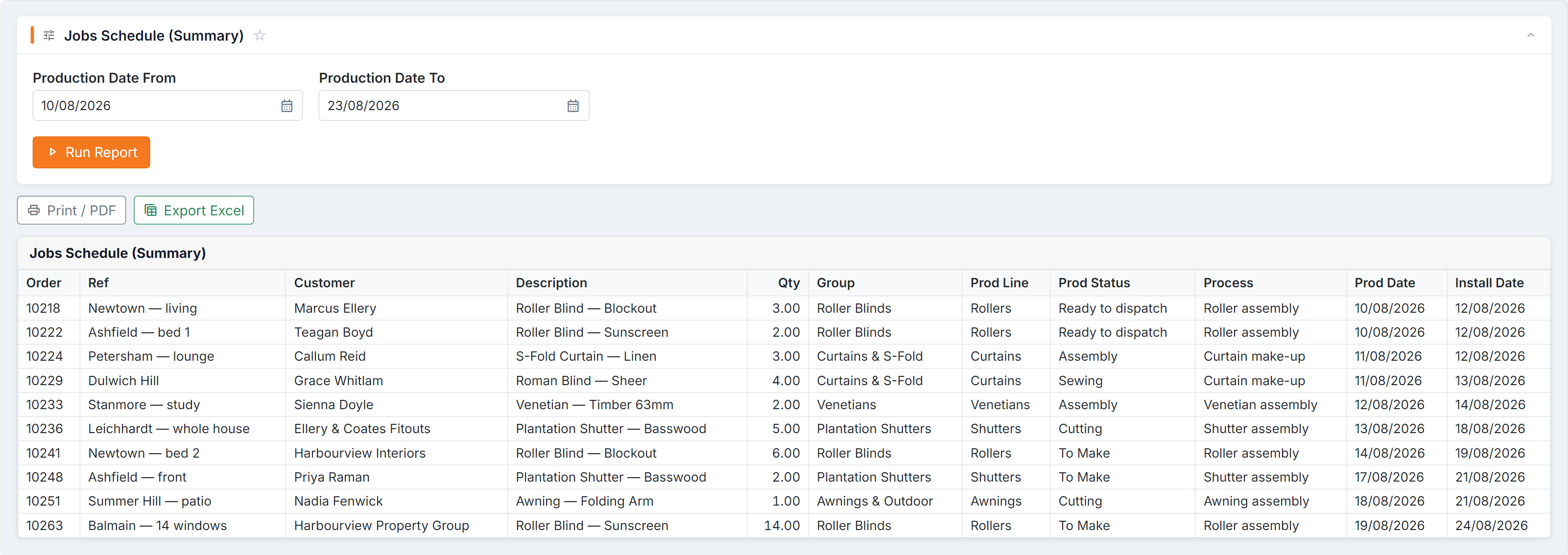
Figure 1 — Jobs Schedule (Summary). The period is a production window, not an install one, so the report answers “what is the workshop making this fortnight” — with Prod Date and Install Date side by side you can see the gap between making a job and fitting it.
Jobs Schedule (Summary)
Section titled “Jobs Schedule (Summary)”Columns: Order · Ref · Customer · Description · Qty · Group · Prod Line · Prod Status · Process · Prod Date · Install Date
The everyday production list — what’s being made, on which line, at what stage, and when it needs to be installed. Prod Date and Install Date side by side is the useful part: it shows you where production has to finish for the install to hold.
Jobs Schedule (Detailed)
Section titled “Jobs Schedule (Detailed)”Columns: Order · Item · Customer · Description · Qty · Amount · Order Status · Prod Line · Prod Status · Production Process · Install Status · Installer · Scheduled
Line-item level, so a single order appears once per item. Adds Amount, Order Status, Install Status and Installer — this is the version to use when someone asks about one specific item, or when you need the value of what’s scheduled.
Jobs Schedule (Shutters)
Section titled “Jobs Schedule (Shutters)”Columns: Order · Customer · Qty · SQM · Prod Line · Prod Status · Prod Date · Install Date · Install Status · Installer · Suburb · P.Code · Mobile
Shutter-specific. SQM is the key addition — shutter capacity is planned by area, not by unit count. Also carries the delivery details (suburb, postcode, mobile) so it doubles as a run sheet.
How to read them
Section titled “How to read them”Common questions
Section titled “Common questions”| Question | Answer |
|---|---|
| A job is missing | These filter on production date. A job with none set won’t appear — check the job. |
| Numbers differ from the Board | Compare with the Job tracking Board, which also uses production dates; the Dispatch Board uses dispatch dates. See which date counts. |
| Shutters report is empty | Nothing with shutter product in the window. |
See also
Section titled “See also”- Work In Progress — undated snapshot of everything open
- Dispatch Schedule reports — the install side