
Sales Orders By Date
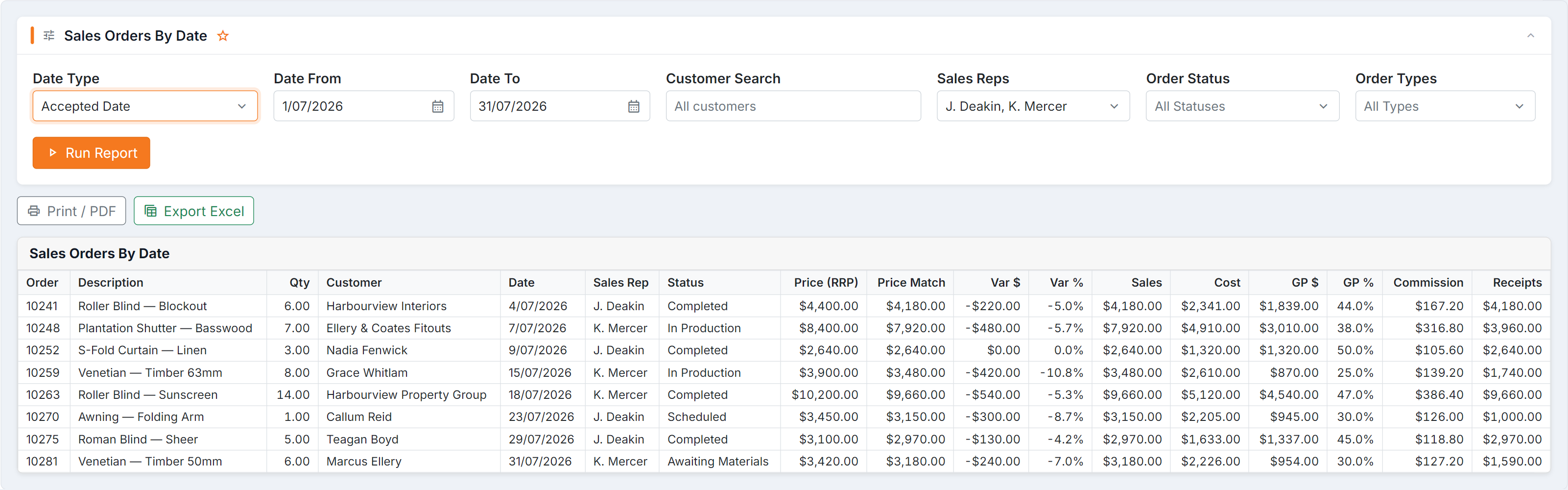
Figure 1 — Sales Orders By Date, BUZ’s most detailed sales report. (1) Date Type decides which date the period applies to — check it before comparing this report with anything else. (2) inc GST switches the sales column between excluding and including tax. (3) GP $ / GP %, Var $ / Var %, Commission and Receipts make this the gross-profit, discounting, commission and collections report all at once.
Parameters
Section titled “Parameters”| Parameter | Notes |
|---|---|
| Date From / Date To | The period |
| Date Type | Which date the period applies to — read the note below |
| Sales Reps | Empty = all reps |
| Order Status | Empty = all statuses |
| Order Types | At least one type is needed. Order also includes older orders from before the current order types |
| Customer Search | Part of a customer name |
| One row per order | Show each order’s totals instead of every item — see Long date ranges |
There’s also an inc GST option that switches the sales column between excluding and including tax. Make sure you know which you’re looking at before quoting a number.
Long date ranges — one row per order
Section titled “Long date ranges — one row per order”Tick One row per order to see each order as a single line with its totals, instead of every item on it. It’s much faster for a long period, such as a full year or several years.
The report also switches to one row per order on its own when the period has more than 100,000 order lines. A blue note at the top of the results tells you when this has happened. All totals, subtotals and the grand total are still complete — nothing is left out.
In this view:
- Click a sales rep to open their orders.
- Click an order to see its items.
- Expand all opens every sales rep, not every order. It is switched off when there are too many orders to show at once.
Very large results in the normal view open one sales rep at a time in the same way.
Columns
Section titled “Columns”The order
| Column | Meaning |
|---|---|
| Order / Description / Qty | What was sold |
| Customer | Who bought it |
| Date | The date, per your Date Type |
| Sales Rep | Who sold it |
| Status | Order status, in the colour set for it in BUZ. An order on a Processing, To Be Invoiced, Production Commenced or Made type of status shows where its job is instead: Job Tracking (production) and Dispatch (install), as classic BUZ does |
The money
| Column | Meaning |
|---|---|
| Price (RRP) | Recommended retail price |
| Price Match | The matched price, where one was given |
| Var $ / Var % | How far the actual price fell below RRP — your discounting |
| Sales (ex/inc T) | Sale value, excluding or including tax |
| Cost | Cost of goods |
| GP $ / GP % | Gross profit in dollars and as a percentage |
| Commission | Commission on the sale |
| Receipts | Money actually received against the order |
The total sales, ex and inc tax, sit at the top of the results next to the order count. The Summary at the end of the report (and of Print and Excel) gives each sales rep’s orders, Total Ex Tax and Total Inc Tax, with the grand total.
A period by Quote Date covers whole days, midnight to midnight, as the classic report does.
How to read it
Section titled “How to read it”- Sort by GP % ascending to find the jobs that made no money.
- Filter to one Sales Rep for a one-to-one review.
- Export to Excel for a pivot by rep, product or month.
Common questions
Section titled “Common questions”| Question | Answer |
|---|---|
| The total doesn’t match my accounts | Check Date Type and the inc/ex GST setting first — that’s nearly always it. |
| GP % looks wrong | Cost drives it. An item with no cost recorded shows an inflated gross profit. |
| Commission looks wrong | Check the commission setup on the rep and the order — this report reflects it, it doesn’t calculate it independently. |
| A rep is missing | They had no orders in that window, or a filter excludes them. |
| Receipts changed for an old order | Receipts now always shows the money received against the whole order. Before October 2026 it could show the wrong figure, so older printouts or exports may differ. |
| The report shows one row per order when I didn’t ask | The period has more than 100,000 order lines. Click an order to see its items, or shorten the period to see every item at once. |