
Reading the appointment cards
Every coloured block on the calendar tells you a lot at a glance.
The parts of one card
Section titled “The parts of one card”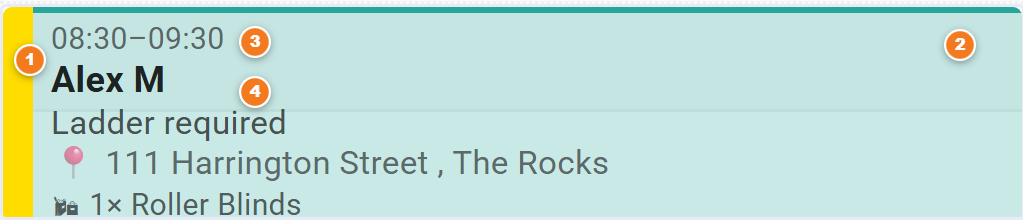
Figure 1 — one appointment card.
- The left bar (colour = status). Where the job is up to — e.g. new, booked, quoted, won. Colours are set by your office.
- The body colour (= the rep). Each sales rep has their own tint, so you can spot whose job it is.
- The time. When the appointment starts and ends.
- Customer name & address. Who it’s for and where. Hover the mouse over the card to see full details.
Special-looking cards
Section titled “Special-looking cards”Some cards look different on purpose, so unusual ones stand out:
- Normal appointment — a coloured left bar and a tinted body. The everyday card.
- Red dashed “ghost” — the appointment you’re creating right now, not yet saved. Drag it to change the time.
- Gold 📌 “Day Note” — a note pinned to a whole day for a rep or installer, not an appointment.
- 🔒 Private appointment — someone’s personal/blocked-out time (dashed edge, lock icon). Not a customer job.
- 🚚 “N to sequence” — installs booked for a day but not yet put in order. Click to see the list.
- ⏰ Red “NO TIME” — a booked lead that still needs a time set. Sits in the all-day strip at the top.