
Follow-ups Overdue
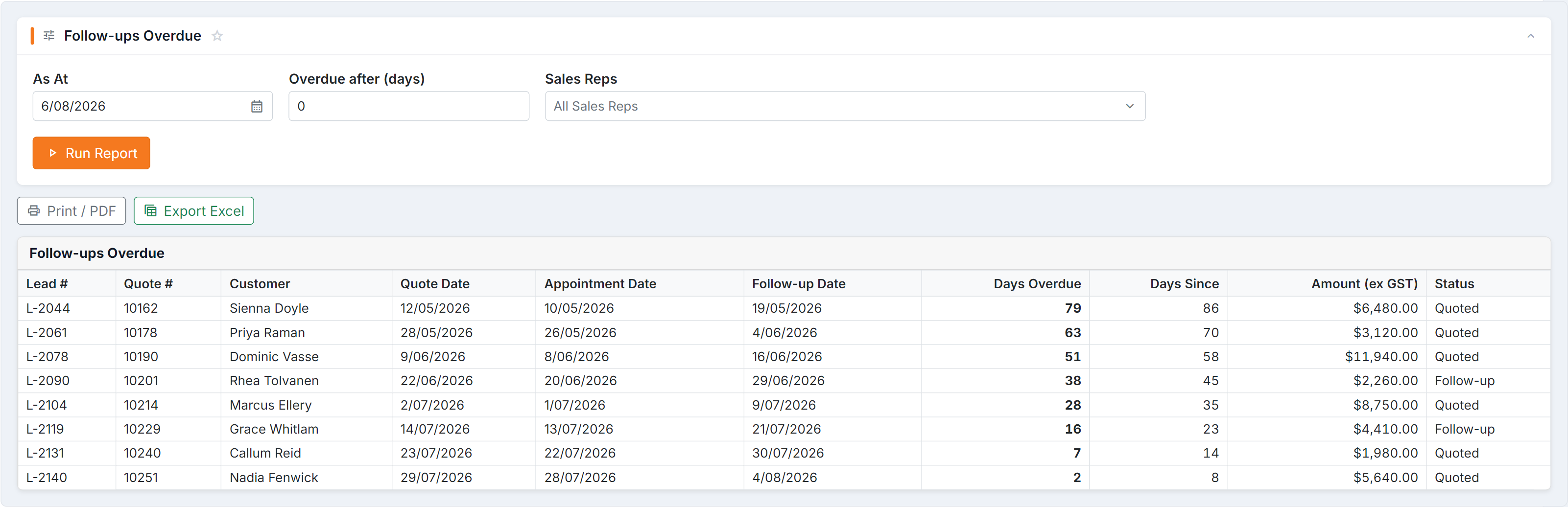
Figure 1 — Follow-ups Overdue, sorted with the longest-waiting quotes first. (1) As At and Overdue after (days) set the measuring date and the grace period — 0 shows everything past its follow-up date. (2) Read Days Overdue for urgency and Amount (ex GST) for priority, together.
Parameters
Section titled “Parameters”| Parameter | Notes |
|---|---|
| As At | The date to measure against — usually today, but you can look back |
| Overdue after (days) | The grace period. 0 shows everything past its follow-up date; 7 shows only those more than a week gone |
| Sales Reps | Empty = all reps |
Columns
Section titled “Columns”| Column | What it tells you |
|---|---|
| Lead # / Quote # | The records to open |
| Customer | Who to call |
| Quote Date / Appointment Date | When it was quoted and when you saw them |
| Follow-up Date | When it should have been chased |
| Days Overdue | How far past that you are |
| Days Since | How long since the quote |
| Amount (ex GST) | What it’s worth |
| Status | Where the lead is up to |
How to use it
Section titled “How to use it”- Days Overdue tells you the urgency; Amount tells you the priority. Read them together.
- Filter to one Sales Rep for a one-to-one; run it with no filter for the team picture.
- A long list of small overdue values is a process problem, not a chasing problem — follow-up dates are being set and ignored.
Common questions
Section titled “Common questions”| Question | Answer |
|---|---|
| Empty report | Either everything is genuinely followed up, or follow-up dates aren’t being set on quotes — check a recent quote to see which. |
| A quote I know is overdue is missing | It has no follow-up date recorded, so there’s nothing to be overdue against. |
| Won and lost quotes are showing | Filter using Status to focus on the ones still live. |