
Banking Transactions Summary
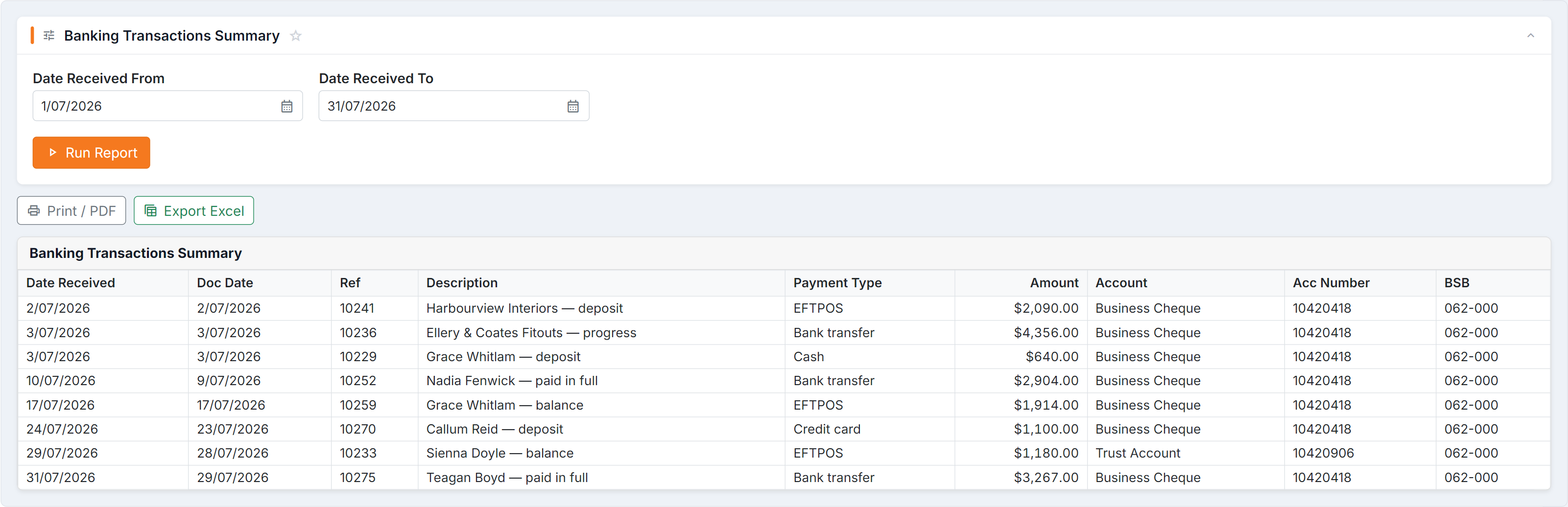
Figure 1 — Banking Transactions Summary: the receipts making up your banking between two received dates, with the payment type and the bank account each one landed in. Note the date parameters filter on when money was received, not the document date beside it.
Parameters
Section titled “Parameters”Date Received From and Date Received To — the date the money was received, not the invoice date.
Columns
Section titled “Columns”| Column | Meaning |
|---|---|
| Date Received | When the money came in |
| Doc Date | The document date |
| Ref | The reference |
| Description | What it was for |
| Payment Type | Cash, card, transfer, and so on |
| Amount | How much |
| Account / Acc Number / BSB | Which bank account it went into |
How to use it
Section titled “How to use it”- Group by Payment Type after exporting to check your card settlements separately from cash.
- Doc Date differing from Date Received is normal — invoiced one day, paid another.
Common questions
Section titled “Common questions”| Question | Answer |
|---|---|
| Completely blank | No deposit slips created for that period. |
| A payment is missing | It hasn’t been included on a deposit slip yet. |
| Wrong bank account | Fix it in Bank accounts, then on the deposit slip. |