
Dispatch Schedule reports
Both take Date From, Date To and an Installer Search.
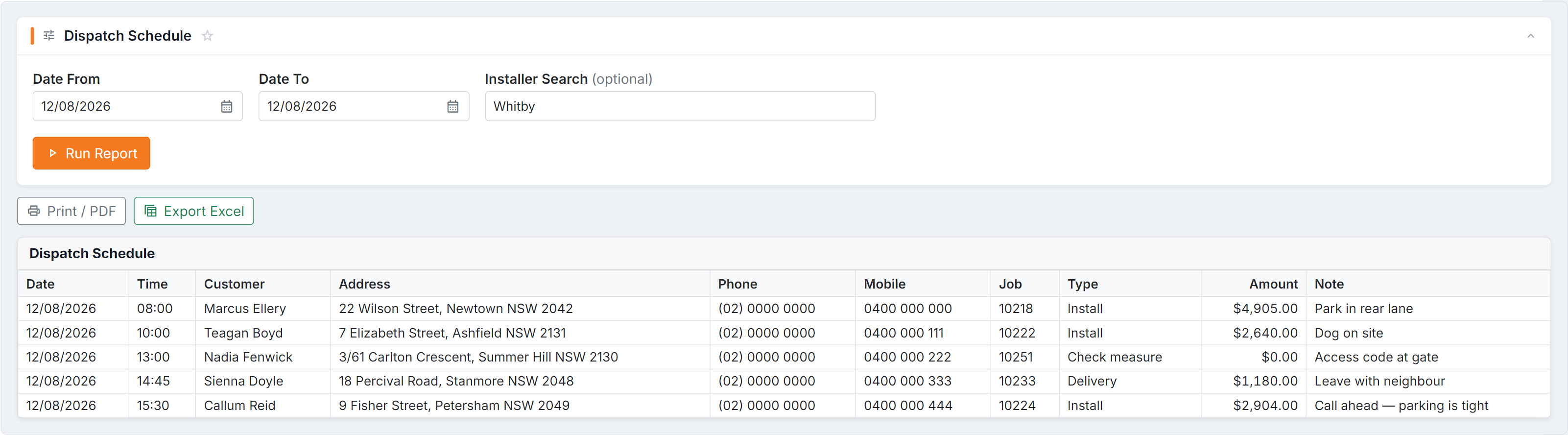
Figure 1 — the Dispatch Schedule is the run sheet: set the same date in Date From and Date To and type part of an installer’s name into Installer Search for one run, or leave it blank for the whole day. Each stop carries the address, both phone numbers, job type, amount and note.
Dispatch Schedule
Section titled “Dispatch Schedule”Columns: Date · Time Pref. · Customer · Suburb · Phone · Order · Status · Order Total · Owing
The money is what makes this one useful: Order Total and Owing side by side means you know before the van leaves whether there’s a balance to collect.
The grand total, Total Ex-GST (Total to Receive) with the amount still owing in brackets, is the last line of the report and also sits in the title bar next to the job count, so it’s there as soon as the report runs.
Each job starts under a heavy line, with its order number in bold.
Sending the sheet out with installers who don’t take payment? Tick Hide amounts next to Print / PDF. It leaves off Order Total, Owing, the Balance Received, Payment Type and Receipt# columns and every total, on screen, on paper and in Excel. This browser remembers the choice for next time.
Dispatch Schedule (Detailed)
Section titled “Dispatch Schedule (Detailed)”Columns: Date · Time · Customer · Address · Suburb (via address) · Phone · Mobile · Job · Type · Amount · Note
The installer’s sheet — full address, both contact numbers, what the job is, its type, and the Note. Print it per installer using Installer Search.
Which to use
Section titled “Which to use”| You want | Use |
|---|---|
| Tomorrow’s plan and what’s owing | Dispatch Schedule |
| A sheet for one installer | Dispatch Schedule (Detailed), filtered by installer |
| To see the route on a map | The dispatch calendar instead |
Common questions
Section titled “Common questions”| Question | Answer |
|---|---|
| Empty for a date I know has installs | Nothing scheduled in that window — check the dates, and whether the installs have dispatch dates set. |
| An installer isn’t found | Installer Search matches part of the name — check the spelling on the installer record. |
| Addresses are missing | The address is missing on the order — fix it there. It also breaks route building. |